Introduction
Professional engineers keep work machines running at peak speed through an approach named RobotOps. Taking care of mechanical helpers mirrors how developers update computer software. However, physical hardware features turning gears, heavy steel links, and spinning tires. People must support their machines continuously after placing them on assembly lines. Mechanics inspect power cables, watch joint heat, push wireless improvements, and solve sudden jams. Dispatchers oversee dozens of roving units at once to keep production on schedule. Anyone can read helpful tutorials about these methods directly at RobotsOps.com.
What Is RobotOps?
Managing factory hardware throughout daily work shifts represents the true core of RobotOps. To begin, builders cut aluminum plates and write guiding software. Then, companies release these active helpers across vast distribution floors. Technicians examine sensor data and battery levels continuously. Programmers dispatch quick bug fixes across local radio bands. Floor staff also replace frayed belts whenever units stop along travel lanes. Regular desktop applications sit behind glass screens. Ground machines roll through grease and collide with wooden bins, which makes daily human care vital.
Why RobotOps Matters
Watching a single wheeled cart demands very little effort. In contrast, running three hundred roaming carriers introduces massive hurdles. Units drain energy cells, break camera lenses, or disconnect from wireless networks. Industrial plants must keep pedestrian pathways safe for floor workers. Live operations tools sound immediate warnings before an idle vehicle blocks a busy loading zone.
| RobotOps Area | Simple Meaning | Main Goal |
| Telemetry | Gathering live machine signals | Detect hot motors before coils melt |
| Updates | Broadcasting code over Wi-Fi | Upgrade device brains without cables |
| Incident Care | Rescuing frozen hardware | Clear blocked paths quickly and safely |
Robot Fleet Management Made Simple
Robot Fleet Management gathers dozens of field vehicles onto one digital control board. The monitor reveals power levels, floor coordinates, active assignments, and warning alerts. Specialists reboot frozen units or steer them around obstacles without stepping onto the floor.
| Task | Without Fleet Management | With Fleet Management |
| Check Battery | Walk down corridors with multimeters | Check every battery gauge on screen |
| Send New Code | Insert flash drives one by one | Transmit files across the fleet at once |
| Find Lost Robot | Hunt through back stockrooms | View exact coordinates on a floor grid |
Industrial Robotics and Robotics Automation
Industrial Robotics focuses on mighty mechanical arms that place car engines, weld steel frames, and box food. An operations suite binds these motorized arms to central safety terminals. Technicians monitor heat levels and joint vibrations so mechanics can replace worn gears before an entire production line halts.
| Robot Type | Common Work | RobotOps Need |
| Mobile Carrier | Hauls heavy bins across floors | Requires fresh lane maps and dock visits |
| Welding Arm | Joins structural steel plates | Requires heat checks and shaft alignment |
| Hospital Rover | Carries sterile tools to clinics | Requires steady radio links and quiet paths |
Robotics Software and ROS 2
Robotics Software directs drive motors and instructs distance sensors to map hallways. Thousands of developers rely on ROS 2, an acronym for Robot Operating System 2. Inside ROS 2, distinct code units called nodes trade data across topics. A camera node processes visual frames, shares pictures across a feed, and helps a drive node steer. The operating system monitors these links to keep message delivery swift.
Robot Simulation Before Real Deployment
Robot Simulation lets developers test mechanical code inside computer simulations before shaping actual metal. Programmers observe wheel turns, sensor readings, and route navigation without cracking expensive structural parts. Simulation catches programming bugs early, yet teams still perform floor trials because virtual physics cannot duplicate real warehouse dirt.
Autonomous Mobile Robots
Autonomous Mobile Robots navigate facilities by finding routes on their own without using ground tape. Across warehouse aisles, they bounce light off walls, construct digital maps, move pallets, and roll toward charging docks when voltage drops. A centralized manager balances electricity usage and assigns routes so transports never run dry mid-delivery.
Robotics Operations Center
A Robotics Operations Center works like a flight control tower for automated machines. Massive video walls display hardware status, live readings, fault logs, and drive speeds. Technicians spot stopped vehicles miles away and restart them directly from office terminals.
Real-Life Scenarios
- A distribution cart drops its Wi-Fi signal: The machine stops automatically to avoid colliding with metal racks. The control desk gets an alert, and a specialist reconnects the wireless link from a computer.
- A mechanical joint generates extra heat: Temperature sensors warn a technician, who halts the conveyor line and greases the bearing before the motor burns out.
- Twenty warehouse carts need fresh map software: Coders roll out the software package simultaneously through cloud networks while the units sit on charging pads.
Common Mistakes to Avoid When Choosing Delhi Events
- Skipping in-person venue tours early: Online galleries hide broken fixtures, poor ventilation, and cramped parking spots.
- Ignoring sudden weather shifts: Scorching afternoon heat or thick winter fog can ruin open garden parties.
- Overlooking municipal noise cutoffs: Police enforce quiet hours across city limits after ten at night.
- Reserving banquet halls without valet spaces: Street traffic quickly snarles whenever drivers lack dedicated parking spots.
- Missing mandatory civic permits: Public gatherings require fire, police, and tax documents well ahead of time.
- Underestimating peak travel times: Guests face two-hour delays whenever venues border main ring roads.
- Hiring caterers without sampling food: Overly spicy dishes alienate guests who prefer mild dining choices.
- Neglecting secondary power generators: City power cuts can shut down sound systems and lighting rigs without warning.
How RobotsOps.com Helps Learners
Clear educational materials on RobotsOps.com teach beginners about modern automated systems. Readers find plain explanations covering multi-machine routing, ROS 2 architecture, virtual environments, and roving platforms. The website helps students and engineers understand central operations desks without burying them under difficult technical jargon.
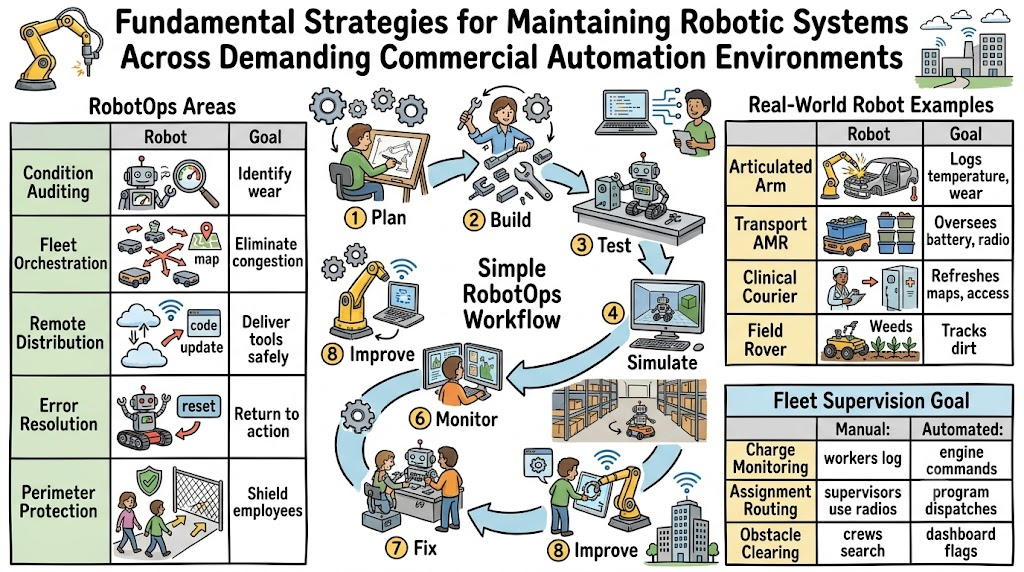
A Simple RobotOps Workflow
- Plan: Select the operational goals for your machine.
- Build: Assemble steel chassis parts, wire optical sensors, and install base code.
- Test: Verify electric current across all steering axles.
- Simulate: Run digital models inside computer rooms to catch logic bugs.
- Deploy: Roll the physical hardware onto real production floors.
- Monitor: Track motor warmth, battery life, and route speed throughout every shift.
- Fix: Swap damaged parts and clear blocked lanes promptly.
- Improve: Distribute updated software patches to raise fleet efficiency year after year.
Frequently Asked Questions
1. What does RobotOps mean?
Sustaining working hardware after setup represents the practice of RobotOps. It takes smart strategies from typical computer network administration. It keeps wheels spinning, software fresh, and power cells balanced. Teams rely on it to catch malfunctions before factory conveyors halt. RobotsOps.com shares plain-English guides on how people manage these fleets daily.
2. How does RobotOps help robot fleet management?
Unified monitors gather dozens of machines onto a single display. Operators track power reserves, travel velocity, and map markers at once. If an aisle carrier stops near a shelf, the computer chimes instantly. Technicians solve the problem from their desks without walking across massive facilities.
3. What is ROS 2 in simple words?
Programmers turn to ROS 2 as an adaptable software toolbox for crafting intelligent machines. It includes prebuilt programs for cameras, steering gear, and floor maps. These reusable scripts keep engineers from writing basic tools from scratch. It helps distinct robot computers talk to one another smoothly.
4. Why is robot simulation important before deployment?
Virtual simulations expose flawed machine code inside 3D video game settings. Designers place virtual carts into simulated rooms to see if digital wheels slide on slopes. This saves money because crashing virtual carts never bends physical metal or breaks costly sensors.
5. What are autonomous mobile robots?
Engineers classify self-steering vehicles that roam buildings without floor tracks as autonomous mobile robots. These machines use laser sensors and small cameras to steer past workers, move bins, and deliver supplies. Central control networks refresh their maps and safeguard their battery reserves.
6. What happens inside a robotics operations center?
Staff members study wall-sized screens showing live machine data inside an operations center. Technicians check speed numbers, review remote camera angles, and dismiss equipment alarms. This centralized overview helps small teams run huge fleets spread across several facilities.
7. How does RobotOps differ from regular DevOps?
Traditional software operations manage computer code that remains on server racks. Operating robots involves moving code, rigid steel skeletons, rubber wheels, and delicate lenses. When field software crashes, a heavy steel cart can hit a wall, so safety rules must stay strict.
8. Why do industrial robotics arms need operations tools?
Heavy steel arms weld, slice, and lift bulky car assemblies throughout the workday. Operations dashboards watch joint friction, balance, and motor heat. By spotting early wear signs, mechanics oil parts before a machine breaks, preventing expensive factory pauses.
9. Can small teams use RobotOps practices?
Modest teams running just two units gain great value from simple error logs. Watching power drain and recording delivery delays keeps small projects running smoothly. As companies acquire more machines, their basic habits expand easily into complete fleet networks.
10. How do robots get software updates safely?
Technicians evaluate new control code inside virtual simulators first. Then, they transmit the files over Wi-Fi to an idle unit sitting on its charging dock. If that test unit operates safely, managers broadcast the update to the remaining fleet overnight.
11. What is machine telemetry in robotics?
Sensor data detailing real-time hardware health is called machine telemetry. The vehicle reports wheel speeds, battery warmth, camera status, and memory load. Programmers track these numbers on dashboard graphs to catch failing bearings before machines break down.
12. Where can beginners learn robotics operations?
Curious beginners start by reading online tutorials and trying free simulation tools. Platforms like RobotsOps.com explain fleet management, ROS 2, and mobile rovers using plain words. Practicing with digital machines in software allows learners to build practical skills quickly.
Conclusion
Intelligent machines transport materials smoothly through factories, hospitals, and busy distribution centers. Constructing durable metal parts only represents the initial step for automation teams. Success requires steady fleet management, sound robotics software, realistic digital simulations, and continuous sensor monitoring. ROS 2 architecture, autonomous mobile robots, and unified control rooms make industrial automation dependable and safe. Knowing how to maintain and repair equipment helps companies get real value from their mechanical workforce. Learners can discover practical guides about fleet care and machine operations on RobotsOps.com.
