Introduction
Getting into tech becomes exciting when you follow a simple plan. Writers craft stories, while printing presses turn those stories into physical books. Modern tech pairs coders with server specialists to deliver fast online services. Beginners often freeze up because hundreds of strange terms appear at once. You can start your journey with DevOpsSchool.org to find structured learning tracks. Master basic keyboard commands on a standard laptop first. Then, practice connecting small software parts into automated release systems. Small daily labs will build your practical abilities much faster than boring lectures. Steady practice gives you total control over modern systems.
What Is a DevOps Roadmap?
This roadmap gives every learner a friendly game plan for success. Decades ago, programmers tossed finished code over a wall to server teams. The server workers struggled to run the code without system crashes. Today, companies unite these groups so software updates arrive every afternoon without trouble. You do not have to conquer fifty different apps to begin. Smart beginners focus on simple concepts like file folders and web traffic. Software tools change constantly, but basic computing rules remain steady forever. A proper learning plan highlights the single skill you need each week. Taking small steps keeps your study hours fun and productive.
A Simple DevOps Learning Path
Your education moves forward from basic computer tools to clever automation systems. Linux teaches you to manage machines through simple typed commands. Git tracks every code revision so nobody deletes vital work by accident. Networking shows you how data moves between web browsers and remote hosts. Next, cloud platforms let you rent computers across the world with ease. Docker packages your programs into compact digital containers. Continuous delivery pipelines test new lines of code within minutes. Then, Kubernetes coordinates dozens of these software containers as one system. You write short files that create full server groups automatically. Lastly, health monitors notify your phone whenever an app slows down.
| Learning Stage | Main Skills | Simple Goal |
| Stage 1: Basics | Linux, Git, Networking | Control computers and save your work safely. |
| Stage 2: Cloud and Boxes | Cloud, Docker Containers | Package apps and run them on rented servers. |
| Stage 3: Pipelines | CI/CD, Kubernetes | Test code fast and manage many apps together. |
| Stage 4: Automation | Code for Servers, Monitoring | Build setups automatically and fix errors quickly. |
DevOps Engineer Roadmap
Engineers link separate software parts into one reliable production pipeline. You write simple Python scripts that perform repetitive testing tasks automatically. You save these scripts inside a shared version control branch. Then, you package your working application into a neat container image. Your deployment pipeline runs automatic checks whenever you push new changes. The pipeline installs the verified software onto an online cloud instance. For instance, imagine creating an online lemonade shop. You write the store layout on your home laptop. The pipeline checks the shopping cart buttons for errors. Next, Docker packages the store into a tidy box. The cloud host runs the container so thirsty customers buy drinks right away.
DevOps Tools You Should Understand
Grouping tools by their practical purpose makes modern systems simple to grasp. Version tools like Git preserve old versions of your project files. Container builders like Docker bundle code alongside essential system helpers. Delivery engines like Jenkins run test batteries before real users see changes. Container managers like Kubernetes direct network traffic into active server pools. Server setup tools create new cloud machines from short text scripts. Health dashboards display system memory usage just like fuel gauges in cars. Log collectors record system events so you can trace strange crashes easily. Cloud networks supply computing capacity on demand, and GitOps controls active setups using code repositories.
| Tool Area | Purpose | Example Tools |
| Source Control | Save and track text changes | Git, GitHub |
| Containers | Pack apps into neat boxes | Docker, Podman |
| CI/CD Pipelines | Test and deliver software fast | Jenkins, GitHub Actions |
| Server Code | Build computer setups with text | Terraform, Ansible |
| System Health | Track live app health and alerts | Prometheus, Grafana |
DevOps Tools Comparison Made Simple
Picking the right software requires matching features against team needs and budgets. First, identify the exact headache you want to cure today. Check the learning effort before introducing fresh software to your teammates. Complicated platforms often demand weeks of study before producing good outcomes. Next, review subscription costs alongside cloud usage bills. Ensure strong security controls protect your private customer data from intruders. Look for helpful internet forums that answer difficult setup questions. Verify that the product communicates smoothly with your existing operating systems. Your team members’ current skills matter far more than flashy marketing promises. Always choose reliable programs that scale upward as site traffic grows.
DevOps Certifications Roadmap
Industry test certificates prove your dedication to continuous self-improvement. Learners should practice with home computer labs before paying for costly exams. Pick basic certifications from major cloud brands to show fundamental competence. Study test rules, voucher fees, and renewal requirements before booking a seat. Most professional credentials expire after twenty-four or thirty-six months. You must review new product features to keep badges valid over time. Practice exams train your brain to answer tricky technical questions under pressure. Yet, passing an exam never guarantees an immediate job offer. Hiring managers value applicants who build working software over test takers. Use certificates to validate your home lab projects.
SRE Roadmap
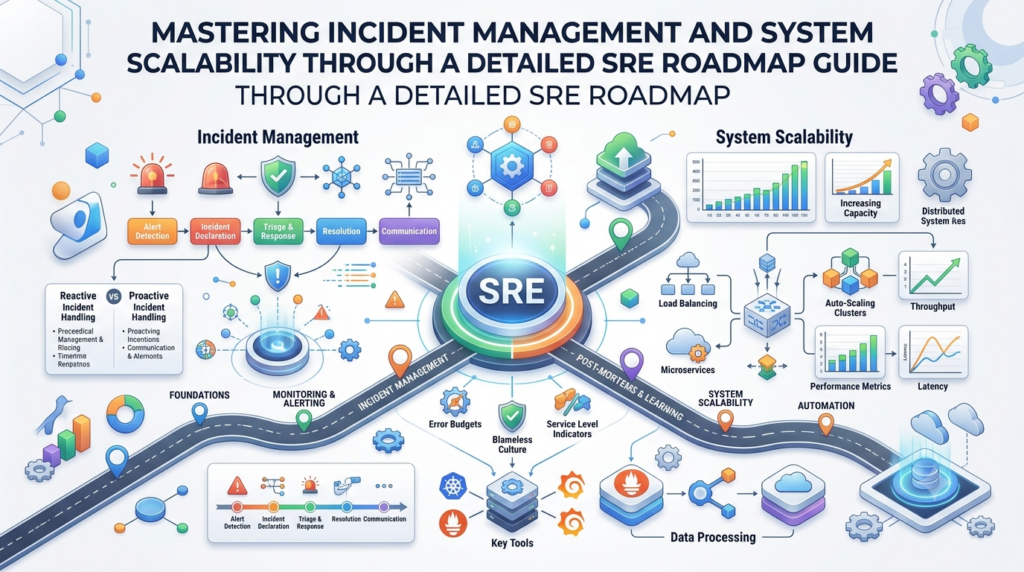
Site reliability engineering trains people to shield websites against sudden crashes. You study how operating systems handle memory and raw network traffic. You design cloud layouts that survive power outages in distant data centers. Next, you build automated alerts that sound before computers run out of space. When an app breaks, you jump in to restore normal operations. Engineers describe this rapid action as incident management. You patch the flaw so identical bugs never cause downtime again. You also agree upon uptime targets with company executives. You calculate the exact downtime allowance for each calendar month. Finally, you adjust server counts ahead of giant seasonal shopping days.
Platform Engineering Roadmap
Platform teams build custom self-service toolkits for software programmers. Tech firms often hire hundreds of developers who build customer features. These programmers want to ship code without tweaking tricky cloud network switches. Platform specialists assemble an internal web dashboard that removes this headache. A coder opens this internal portal and spins up a database with one click. The platform team configures networks, access keys, and delivery pipelines behind the scenes. Think of a busy pizza kitchen with a dedicated prep crew. The prep crew slices toppings and heats ovens so the chef bakes fast. Platform engineers prepare cloud systems so programmers release features without friction.
Real-Life Scenarios / Experiences
- A newcomer attempted to learn nine different tools at once and quit in frustration. Spending three weeks mastering basic Linux commands restored confidence and made cloud concepts clear.
- A digital newspaper crashed every Tuesday during content updates. The team added an automated delivery pipeline to check articles and code, which eliminated publishing outages entirely.
- A startup configured cloud machines by manually typing settings into browser forms. Staff introduced mistakes and struggled during outages until they stored server definitions as text files.
- An apprentice engineer answered a middle-of-the-night crash notice for an online checkout page. Reading recent server log entries pinpointed an expired certificate, enabling a ten-minute fix.
Common Mistakes to Avoid When Choosing Delhi Events
- Buying tickets from unofficial street vendors often leaves you holding fake entry passes. Purchase passes through verified event portals or certified stadium box offices.
- Arriving moments before kickoff traps you in long security lines outside the gates. Reach the entry gates sixty minutes early to clear metal detectors calmly.
- Driving family vehicles toward crowded stadiums creates huge parking delays. Ride the metro transit lines to reach the event doors on schedule.
- Forgetting venue security policies causes guards to confiscate personal backpacks. Read the list of prohibited items on the event website before leaving home.
- Ignoring evening rain forecasts leaves you drenched during outdoor amphitheater performances. Pack a compact poncho or an umbrella inside your jacket pocket.
- Carrying zero paper money creates problems at neighborhood food stalls. Bring physical cash notes to buy snacks and bottled water without card delays.
- Overlooking stadium exit signs causes confusion when giant crowds leave together. Note the nearest emergency exits as soon as you find your assigned seat.
- Reserving hotel rooms before organizers confirm dates risks wasted booking deposits. Wait for official artist announcements before paying for non-refundable hotel stays.
How DevOpsSchool.org Fits Into Your Learning Plan
Structured resources keep your technical studies moving in the right direction. DevOpsSchool.org organizes complete ninety-day study calendars for modern engineering fields. You can follow clear roadmaps covering software delivery, site reliability, and platform engineering. The platform maintains a technology directory that groups and evaluates popular tools. Students can review certification handbooks and clear exam preparation guides. The site also supplies beginner labs, tutorials, and a plain-English reference glossary. These open materials guide self-starters who want clear milestones instead of guessing online. You can check the structured plans whenever you need clarity on your next learning step.
DevOps Jobs and Career Growth
Modern companies offer multiple career opportunities for people with delivery skills. DevOps specialists build automated pipelines and manage daily production releases. Site reliability professionals guard uptime numbers and handle emergency outages. Cloud architects map out secure data networks across online host platforms. Platform engineers craft internal web consoles that help developers work without delays. DevSecOps analysts inspect code pipelines to block security risks before launch day. You can prepare for these roles by publishing working projects on GitHub. Show prospective bosses that you can fix errors and automate routine tasks. Consistent home practice will help you build a durable engineering career.
Frequently Asked Questions
1. Which routine jobs fill an engineer’s daily schedule?
Engineers write short scripts that handle repetitive testing and deployment tasks. They check system health, inspect error logs, and update cloud components. When web pages load slowly, they track down the bottleneck to restore speed. Their primary focus keeps code releases safe, swift, and steady for users.
2. Can total novices start without a software degree?
Anyone can start learning these concepts without an advanced computer degree. You only need to learn simple automation scripting using Python or Bash. These short scripts link programs together and update server settings automatically. You direct existing tools rather than building giant video game engines from scratch.
3. How many months will basic studies require?
Most students need four to six months of steady daily effort. Spending ninety minutes each evening generates excellent retention over time. You spend the opening weeks practicing terminal commands and Git commands. Afterwards, you assemble containers and test simple cloud servers using small personal labs.
4. Why must students master Linux before other tools?
Linux powers the vast majority of web servers and cloud machines worldwide. Controlling this operating system through text commands gives you complete mastery over remote computers. You can practice common Linux commands on your current computer using lightweight virtual setups.
5. Must you buy a powerful workstation for practice?
A basic laptop with eight gigabytes of memory handles beginner labs easily. Modern container tools use very few system resources during small tests. Additionally, cloud companies offer free introductory accounts that let you test servers online without expensive hardware investments.
6. Do technology companies demand certificates from applicants?
Managers look for practical lab projects far more than paper exam certificates. Passing a test demonstrates that you understand technical vocabulary. However, presenting a functional application inside a public code repository proves your hands-on value. Treat certifications as an extra boost for your resume.
7. Where do delivery tasks differ from reliability goals?
Delivery tasks focus on moving fresh application code into production smoothly. Reliability engineering works to prevent downtime, improve response speed, and block crashes. One specialty builds the distribution pipeline, while the other defends stability during heavy traffic. Both roles share identical command-line tools.
8. Which cloud company should a beginner select?
Pick between Amazon Web Services, Microsoft Azure, or Google Cloud Platform. Choose the specific provider that local technology employers request in local job postings. Every major platform uses similar storage, network, and computing designs. Transitioning between these platforms later takes minimal effort.
9. Why does Git play such a huge role in automation?
Git saves every edit you make across project files over time. You can revert broken code changes by running a single console instruction. Modern teams keep server scripts inside repositories so automated tools deploy infrastructure whenever an engineer pushes fresh changes.
10. How do you launch your initial home lab project?
Build a tiny web page using plain HTML on your computer. Save the page inside a Git repository to record your edits. Next, build a Dockerfile that places the page inside a web server container. Run that container on a free cloud server and test the web address.
11. What strategy works best when comparing two tools?
Review the main purpose of each tool before checking extra features. Test how quickly you can complete a basic project without hitting road blocks. Look for active message boards where other users share solutions. Select the software that matches your present team size and budget.
12. Where can people locate organized study tracks?
DevOpsSchool.org shares open educational paths across modern technical subjects. The platform offers ninety-day schedules, software comparison directories, and certification roadmaps. Learners use these materials to tackle topics in a clear, step-by-step sequence.
Conclusion
Starting your software engineering journey pays off when you stick to a clear schedule. Learn fundamental skills like terminal commands, file versioning, and networking first. Focus on one topic at a time so you never feel buried under confusing terminology. Build small projects on your personal computer to convert textbook concepts into functional muscle memory. Avoid the temptation to learn every single tool that trends on social networks. Treat certifications as helpful bonuses that validate real experience rather than magic job tickets. Later, you can explore specialized paths like site reliability or platform creation. Patient, steady practice will turn you into an accomplished technical professional.
